> ## Documentation Index
> Fetch the complete documentation index at: https://docs.phantom.com/llms.txt
> Use this file to discover all available pages before exploring further.
# Domain and transaction warnings
> Understand the domain and transaction warnings Phantom displays to protect users and how to resolve them.
Phantom may display different warnings when users connect to your app or sign transactions.
These warnings are designed to help protect users from unexpected or unsafe activity.
## New domain warning
If your app or website has been newly launched, Phantom may show users the following message:
> *“This domain is new or has not been reviewed yet. Proceed with caution.”*
 This warning appears automatically for newly detected domains and typically disappears after a few days once the domain has been reviewed.
There’s usually **no action required** on your part. If the warning remains visible for more than a week, contact our domain review team using this [form](https://docs.google.com/forms/d/1JgIxdmolgh_80xMfQKBKx9-QPC7LRdN6LHpFFW8BlKM/viewform).
## App identity verification warning
When users connect to a native Android app through [Mobile Wallet Adapter (MWA)](https://solana-mobile.github.io/mobile-wallet-adapter/spec/spec.html), Phantom verifies that the app is genuinely associated with the web domain it claims as its identity. If Phantom can't complete this verification, users see the following message:
> *"This app's identity could not be verified. It may be impersonating another app."*
This verification is domain-based, as defined in the [MWA dapp identity verification spec](https://solana-mobile.github.io/mobile-wallet-adapter/spec/spec.html#dapp-identity-verification). Phantom checks the [Digital Asset Links](https://developers.google.com/digital-asset-links/v1/statements) file hosted on your domain and confirms that your app's package name and signing certificate match an `android_app` statement in that file.
The warning appears when any of the following verification requirements are missing:
* Your `authorize` request doesn't include a `uri` in its `identity`.
* Your domain doesn't host a Digital Asset Links file at `/.well-known/assetlinks.json`.
* Your app's package name or signing certificate fingerprint doesn't match the statements in the file.
### Resolve the warning
**1. Host a Digital Asset Links file**
Publish `https://yourapp.com/.well-known/assetlinks.json` declaring your app's package name and the SHA-256 fingerprint of its signing certificate:
```json theme={null}
[
{
"relation": ["delegate_permission/common.handle_all_urls"],
"target": {
"namespace": "android_app",
"package_name": "com.yourapp.android",
"sha256_cert_fingerprints": [
"AA:BB:CC:DD:EE:FF:00:11:22:33:44:55:66:77:88:99:AA:BB:CC:DD:EE:FF:00:11:22:33:44:55:66:77:88:99"
]
}
}
]
```
If you distribute through Google Play with Play App Signing, use the app signing key certificate fingerprint from the Play Console (**Protected with Play → Play Store protection → Manage Play app signing**), not your upload key. A mismatched fingerprint is the most common cause of failed verification.
**2. Include your domain in the identity of your authorization request**
The `uri` must point to the domain that hosts your `assetlinks.json` file:
```typescript theme={null}
import { transact } from "@solana-mobile/mobile-wallet-adapter-protocol-web3js";
try {
const authorization = await transact(async (wallet) => {
return await wallet.authorize({
chain: "solana:mainnet",
identity: {
name: "Your App",
uri: "https://yourapp.com", // Domain hosting /.well-known/assetlinks.json
icon: "favicon.ico",
},
});
});
console.log("Authorized:", authorization.accounts[0]?.address);
} catch (err) {
// Thrown if the user declines, or if the wallet rejects the request
console.error("Authorization failed:", err.message);
}
```
You can confirm your Digital Asset Links file is live and valid with the following command, which fails if the file is missing or isn't a JSON array:
```bash theme={null}
curl --fail https://yourapp.com/.well-known/assetlinks.json | jq -e 'type == "array"'
```
Once the file is correctly hosted and your signing certificate matches, verification completes automatically on the next connection. No submission to Phantom is required.
## Transaction simulation warning
If Phantom can’t accurately simulate a transaction before it’s sent, users may see the following message:
> *“This dApp could be malicious. Do not proceed unless you are certain it is safe.”*
This warning appears automatically for newly detected domains and typically disappears after a few days once the domain has been reviewed.
There’s usually **no action required** on your part. If the warning remains visible for more than a week, contact our domain review team using this [form](https://docs.google.com/forms/d/1JgIxdmolgh_80xMfQKBKx9-QPC7LRdN6LHpFFW8BlKM/viewform).
## App identity verification warning
When users connect to a native Android app through [Mobile Wallet Adapter (MWA)](https://solana-mobile.github.io/mobile-wallet-adapter/spec/spec.html), Phantom verifies that the app is genuinely associated with the web domain it claims as its identity. If Phantom can't complete this verification, users see the following message:
> *"This app's identity could not be verified. It may be impersonating another app."*
This verification is domain-based, as defined in the [MWA dapp identity verification spec](https://solana-mobile.github.io/mobile-wallet-adapter/spec/spec.html#dapp-identity-verification). Phantom checks the [Digital Asset Links](https://developers.google.com/digital-asset-links/v1/statements) file hosted on your domain and confirms that your app's package name and signing certificate match an `android_app` statement in that file.
The warning appears when any of the following verification requirements are missing:
* Your `authorize` request doesn't include a `uri` in its `identity`.
* Your domain doesn't host a Digital Asset Links file at `/.well-known/assetlinks.json`.
* Your app's package name or signing certificate fingerprint doesn't match the statements in the file.
### Resolve the warning
**1. Host a Digital Asset Links file**
Publish `https://yourapp.com/.well-known/assetlinks.json` declaring your app's package name and the SHA-256 fingerprint of its signing certificate:
```json theme={null}
[
{
"relation": ["delegate_permission/common.handle_all_urls"],
"target": {
"namespace": "android_app",
"package_name": "com.yourapp.android",
"sha256_cert_fingerprints": [
"AA:BB:CC:DD:EE:FF:00:11:22:33:44:55:66:77:88:99:AA:BB:CC:DD:EE:FF:00:11:22:33:44:55:66:77:88:99"
]
}
}
]
```
If you distribute through Google Play with Play App Signing, use the app signing key certificate fingerprint from the Play Console (**Protected with Play → Play Store protection → Manage Play app signing**), not your upload key. A mismatched fingerprint is the most common cause of failed verification.
**2. Include your domain in the identity of your authorization request**
The `uri` must point to the domain that hosts your `assetlinks.json` file:
```typescript theme={null}
import { transact } from "@solana-mobile/mobile-wallet-adapter-protocol-web3js";
try {
const authorization = await transact(async (wallet) => {
return await wallet.authorize({
chain: "solana:mainnet",
identity: {
name: "Your App",
uri: "https://yourapp.com", // Domain hosting /.well-known/assetlinks.json
icon: "favicon.ico",
},
});
});
console.log("Authorized:", authorization.accounts[0]?.address);
} catch (err) {
// Thrown if the user declines, or if the wallet rejects the request
console.error("Authorization failed:", err.message);
}
```
You can confirm your Digital Asset Links file is live and valid with the following command, which fails if the file is missing or isn't a JSON array:
```bash theme={null}
curl --fail https://yourapp.com/.well-known/assetlinks.json | jq -e 'type == "array"'
```
Once the file is correctly hosted and your signing certificate matches, verification completes automatically on the next connection. No submission to Phantom is required.
## Transaction simulation warning
If Phantom can’t accurately simulate a transaction before it’s sent, users may see the following message:
> *“This dApp could be malicious. Do not proceed unless you are certain it is safe.”*
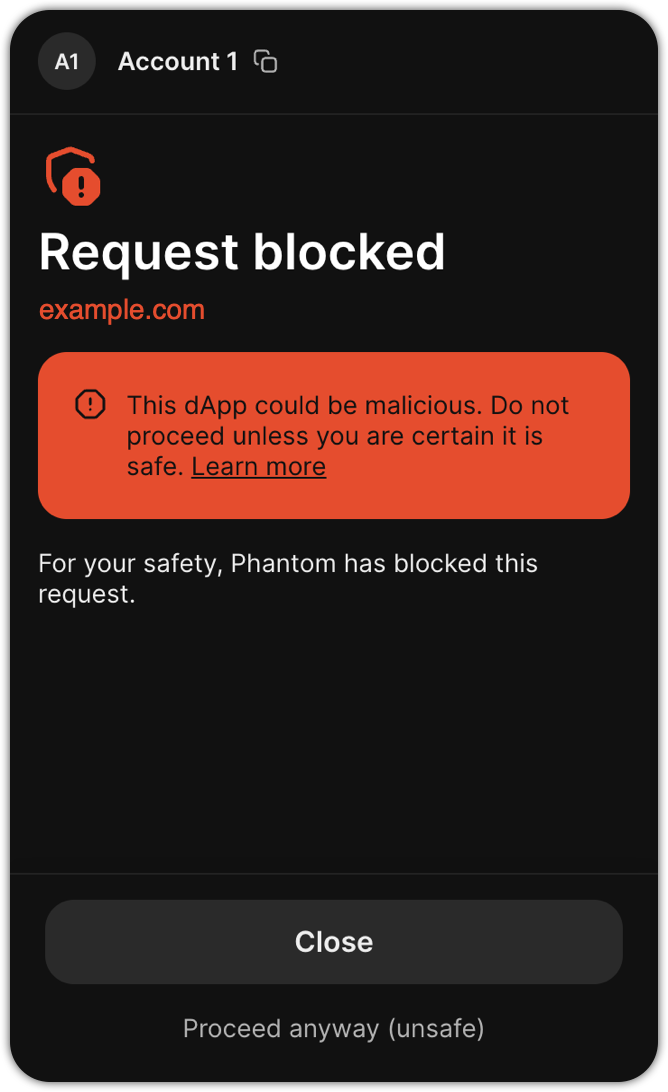 This message appears when Phantom is unable to safely predict a transaction’s outcome before execution.
If Phantom displays this warning when you sign a transaction on your domain, follow these steps:
* Limit the transaction to **one** signer.
* If the transaction requires multiple signers, sign it with Phantom first using [signTransaction](https://docs.phantom.com/solana/sending-a-transaction#sign-a-transaction-without-sending) instead of signAndSendTransaction, then collect signatures from the other signers.
* If your transaction approaches Solana’s size limit, split it into multiple signing requests or use [Address Lookup Tables](https://docs.phantom.com/solana/sending-a-transaction-1#build-an-address-lut).
* Before submitting the transaction for signing, simulate the transaction with `sigVerify: false` using your RPC node to ensure it will not fail onchain. Failed transactions could trigger simulation warnings.
If you've made these changes and the warning persists, or if you can't apply these changes, contact our domain review team using this [form](https://docs.google.com/forms/d/1JgIxdmolgh_80xMfQKBKx9-QPC7LRdN6LHpFFW8BlKM/viewform).
## Prediction market token burn warning
If a transaction attempts to burn a prediction market token, Phantom may show users the following message:
> *"This transaction will burn a valuable prediction market token. Please use the Phantom app to close the position first."*
This warning appears when Phantom detects a transaction that would permanently burn a prediction market token.
To resolve this warning, contact our Trust and Safety team using this [form](https://docs.google.com/forms/d/1JgIxdmolgh_80xMfQKBKx9-QPC7LRdN6LHpFFW8BlKM/viewform).
This message appears when Phantom is unable to safely predict a transaction’s outcome before execution.
If Phantom displays this warning when you sign a transaction on your domain, follow these steps:
* Limit the transaction to **one** signer.
* If the transaction requires multiple signers, sign it with Phantom first using [signTransaction](https://docs.phantom.com/solana/sending-a-transaction#sign-a-transaction-without-sending) instead of signAndSendTransaction, then collect signatures from the other signers.
* If your transaction approaches Solana’s size limit, split it into multiple signing requests or use [Address Lookup Tables](https://docs.phantom.com/solana/sending-a-transaction-1#build-an-address-lut).
* Before submitting the transaction for signing, simulate the transaction with `sigVerify: false` using your RPC node to ensure it will not fail onchain. Failed transactions could trigger simulation warnings.
If you've made these changes and the warning persists, or if you can't apply these changes, contact our domain review team using this [form](https://docs.google.com/forms/d/1JgIxdmolgh_80xMfQKBKx9-QPC7LRdN6LHpFFW8BlKM/viewform).
## Prediction market token burn warning
If a transaction attempts to burn a prediction market token, Phantom may show users the following message:
> *"This transaction will burn a valuable prediction market token. Please use the Phantom app to close the position first."*
This warning appears when Phantom detects a transaction that would permanently burn a prediction market token.
To resolve this warning, contact our Trust and Safety team using this [form](https://docs.google.com/forms/d/1JgIxdmolgh_80xMfQKBKx9-QPC7LRdN6LHpFFW8BlKM/viewform).